3Dash
Played 402 times.
100% (1/1)


Description
Instructions
Categories Tags Comments

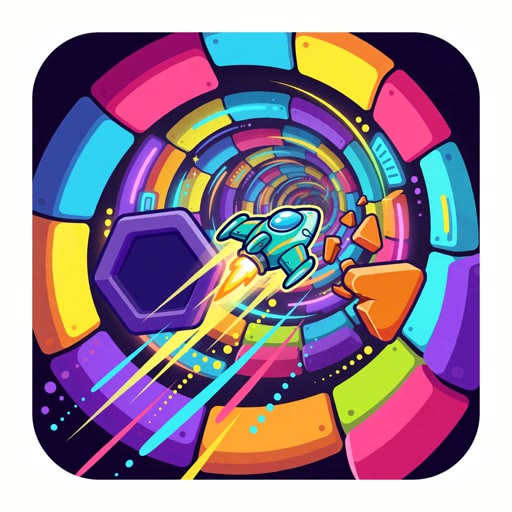
3Dash is a kinetic, 3‑dimensional rhythm platformer that puts your reflexes to the test. Capitalizing on the core mechanics that made Geometry Dash a staple, 3Dash throws you into ever‑shifting tracks where timing and precision are everything. Each level spins while you dash forward, jump over gaps, and flip across rotating planes, demanding that you stay in sync with an electronic beat that pulses in the background.
The six hand‑crafted stages are designed to tighten your sense of rhythm while gradually ramping up the speed and complexity. Once you finish the core set, you can unleash your creativity with the built‑in editor. Craft new courses, tweak timing, and share your designs with peers—creating a loop of endless replay that keeps the game fresh. For fans of other rhythm‑driven challenges, the community may also enjoy cross‑playing with titles like Rewind House, where timing and pattern recognition drive the experience, or dipping into the puzzle-oriented Sort Right for a change of pace.
Gameplay is intentionally lightweight, yet demands focus. Every move must be executed with sharp perception: the slightest misstep means a reset. The editor is intuitive, letting players experiment with track narrowing, obstacle placement, and tempo alterations without heavy scripting. This ease of creation encourages communities to remix levels, publishing them on forums or sharing directly through the portal. Those looking for cooperative contests might also turn to the single‑player yet socially engaging Hook A Brainrot for a brief side venture.
Whether you’re leaning into the adrenaline of the on‑screen action or the creative freedom of level design, 3Dash offers a focused, rhythmic challenge that is both accessible and demanding. Its clean UI, responsive controls, and tight synchronization between visuals and audio set a standard for minimalist yet addictive platformers.
The six hand‑crafted stages are designed to tighten your sense of rhythm while gradually ramping up the speed and complexity. Once you finish the core set, you can unleash your creativity with the built‑in editor. Craft new courses, tweak timing, and share your designs with peers—creating a loop of endless replay that keeps the game fresh. For fans of other rhythm‑driven challenges, the community may also enjoy cross‑playing with titles like Rewind House, where timing and pattern recognition drive the experience, or dipping into the puzzle-oriented Sort Right for a change of pace.
Gameplay is intentionally lightweight, yet demands focus. Every move must be executed with sharp perception: the slightest misstep means a reset. The editor is intuitive, letting players experiment with track narrowing, obstacle placement, and tempo alterations without heavy scripting. This ease of creation encourages communities to remix levels, publishing them on forums or sharing directly through the portal. Those looking for cooperative contests might also turn to the single‑player yet socially engaging Hook A Brainrot for a brief side venture.
Whether you’re leaning into the adrenaline of the on‑screen action or the creative freedom of level design, 3Dash offers a focused, rhythmic challenge that is both accessible and demanding. Its clean UI, responsive controls, and tight synchronization between visuals and audio set a standard for minimalist yet addictive platformers.
Instructions
Goal: Complete each track without colliding with any obstacles.
Controls (mouse/keyboard):
- Left‑click / Space: Jump.
- Right‑click / Shift: Dash forward.
- Roll the mouse left/right (or press A/D): Flip to the adjacent plane of the rotating track.
Gameplay mechanics and tips:
1. Keep an eye on the beat; the brighter the colors, the faster the action.
2. Anticipate upcoming obstacles by matching your jump or dash timing to the rhythm.
3. Use the flip mechanic strategically to avoid obstacles on the current plane.
4. The editor allows you to vary track speed—experiment with the “tempo” slider to create tighter or looser levels.
5. Play through the learning levels before attempting the hardest tracks; they establish the core patterns.
6. Save and share your custom courses to challenge friends or invite community feedback.
Controls (mouse/keyboard):
- Left‑click / Space: Jump.
- Right‑click / Shift: Dash forward.
- Roll the mouse left/right (or press A/D): Flip to the adjacent plane of the rotating track.
Gameplay mechanics and tips:
1. Keep an eye on the beat; the brighter the colors, the faster the action.
2. Anticipate upcoming obstacles by matching your jump or dash timing to the rhythm.
3. Use the flip mechanic strategically to avoid obstacles on the current plane.
4. The editor allows you to vary track speed—experiment with the “tempo” slider to create tighter or looser levels.
5. Play through the learning levels before attempting the hardest tracks; they establish the core patterns.
6. Save and share your custom courses to challenge friends or invite community feedback.
Categories Tags Comments
You must log in to write a comment.